The model file and the YAML menu
The model is a YAML text file, the same one the floating-base package reads from the
command line. The tabs on the left (Links, Wheels, Environment, Motion, ForDyn, InvDyn) edit it
for you, and every key of the file has a place in them, so you do not need to look at the text
to build, change or run a robot. Save as writes the file as it is, so a comment you wrote
outside the links: and wheels: parts is kept, and the saved file runs from the command line.
The YAML menu
The YAML menu in the toolbar is for the file itself:
- Show YAML... opens a read-only window with the whole text, with Copy to clipboard. It shows what the tabs have written, which is a good way to learn the format, and it is the way to copy a model into a message or a report.
- Open in a text editor opens the file in your system's text editor, for a change the tabs cannot make, or just to read it. Save the model first (it opens the file on disk, without your unsaved changes), edit and save in the editor, then:
- Reload from disk reads the file again. If you have unsaved changes, the program asks whether to save them or discard them first.
If the file cannot be read
A file with a YAML mistake (a missing bracket, a wrong indentation) or one that is not a list of
name: value lines cannot be shown in the tabs. The left panel then shows a red message that
says where the mistake is, for example The model file is not valid YAML, line 7, column 7:
expected ',' or ']', but got ':', and the tabs are hidden (so they do not show the previous
model). The Model tab says that the model cannot be drawn.
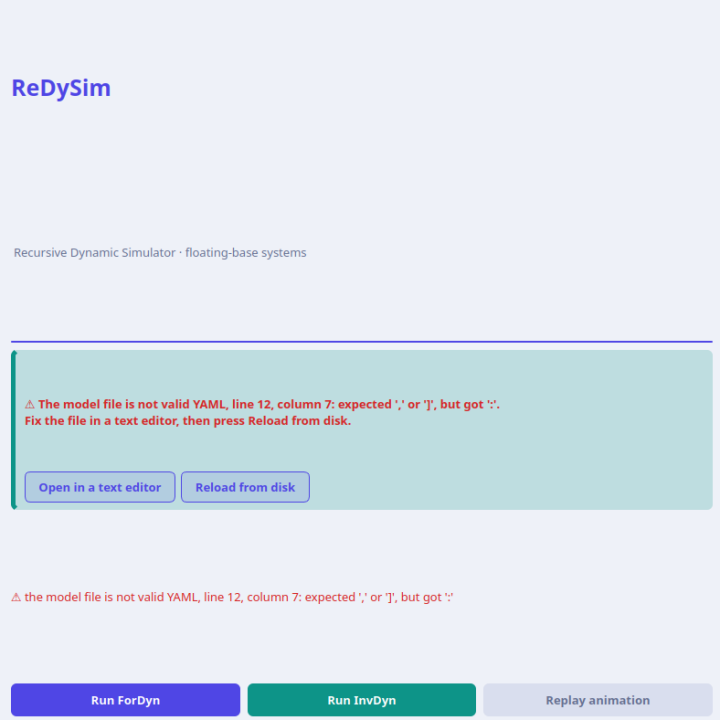
Press Open in a text editor, fix the line, save, and press Reload from disk. The tabs come back.
A file that is valid YAML but not a valid model (for example a link whose parent comes later) is different: the tabs stay, and the line under them and the Model tab say what the package does not accept, so you can fix it in the tables.
Undo
Ctrl+Z, Ctrl+Y (or Ctrl+Shift+Z), and the Undo, Redo and Revert buttons undo and redo the whole model from anywhere in the window, also inside a text box. See Undo, redo and revert.
Writing the file by hand
What the keys are
The names below are the ones of the bundled models (the models/floating-base/ folder), which are the
best examples to copy from (open one, then YAML > Show YAML...).
The bundled space_robot.yaml has seven links and six joints: two three-link arms. Its move takes 4 s with PD gains 400/40. The separate MATLAB five-link model is space_robot_matlab.yaml (30 s, gains 49/14).
The 15 source floating-base files also include wheel_legged.yaml (four driven wheels at the
ends of four legs), quadcopter.yaml (one free body with four ideal rotors), and
mobile_manipulator.yaml (a two-joint arm on a differential-drive base).
A controller for forward dynamics, under fordyn: torque:. It has its own editor in the
ForDyn tab, so you do not need to look for it here, but it is the same
text:
fordyn:
  torque:
    pd: {kp: 400, kd: 40}          # towards the trajectory below
| controller | use |
|---|---|
free |
no torques: the joints move freely |
pd |
proportional-derivative control towards the joint trajectory (kp, kd) |
computed_torque |
computed-torque control towards the trajectory (kp, kd); used by the walking robots |
constant |
constant joint torques |
diff_drive |
a two-wheel robot: follow: trajectory controls wheel speed from the Motion tab, or use a separate forward and turning speed schedule |
car_drive |
a four-wheel car: follow: trajectory controls rear wheel speed and front steering from the Motion tab, or use a separate speed and steering schedule |
mobile_manipulator |
differential drive and a timed two-joint arm motion |
wheel_leg |
four legs held at a stand or crouch stance, with two driven wheels on each side; follow: trajectory uses the shared Motion-tab trajectory |
quad_flight |
four rotor thrusts control position and yaw waypoints; forward dynamics only |
custom |
your own Python function (only from the command line: the GUI does not run files that run code) |
A joint motion, as trajectory: (it has its own editor in the
Motion tab, the same text):
trajectory:
  cycloidal:
    q0: [0.3803, -0.6198, 0.0, 2.4411, 1.7062, 0.0]
    qf: [-0.2530, -1.8050, 0.6, 3.3946, 1.8050, -0.6]
    duration: 4.0
cycloidal moves the joints smoothly between two sets of angles. joint_waypoints moves
through timed poses with zero speed and acceleration at each pose. constant holds the joints.
mobile_manipulator_motion drives the wheels, stops, then moves the arm; both dynamics modes
use that one Motion-tab entry.
wheel_leg_motion gives the wheel-legged robot a compact wheel-speed and knee-bend
motion shared by forward and inverse dynamics.
biped_gait, quadruped_gait and hexapod_gait produce a walking motion (step time, stride,
foot height, hip height). Inverse dynamics runs on this motion, and a forward run with a
controller follows it.
The base start when it is not plain numbers, under base:: from_gait takes the start
pose from the gait, and euler, euler_rate and attitude: euler_parameters give it in
another form. It has its own editor under the fields of the
ForDyn and InvDyn tabs, the same text.
How the robot is drawn, as scene: (the Model tab and the animation use it). It has its
own editor at the bottom of the Environment tab, the
same text:
scene:
  legs: [[2, 3, 4], [5, 6, 7]]     # chains of links, drawn through their ends
  trunk: true                      # link 1 as a line
  ground: true                     # the ground plane (false: a robot in space)
| key | meaning |
|---|---|
legs |
chains of link numbers, each drawn as a line through the ends of its links |
trunk |
draw link 1 as a line from its start to its tip |
body |
the outline of the trunk: the link numbers whose start points are joined |
boxes |
boxes on a link: {link, center, size}, the size along the link axes (the Pioneer's chassis) |
rotors |
four stationary discs: {link, center, radius}, used by the quadcopter |
wheels |
drawn automatically for the wheels in the wheels: part |
ground, follow |
draw the ground plane; follow: w keeps a window of half-width w metres on a robot that travels far |
Without a scene: the GUI draws every leg as a chain of links. See
Model and animation for what is added to the drawing besides the scene.
Other keys: wheel_axes (the plane for wheels when there is no ground:, as [2, 1, 3])
has a field in the Environment tab, and so do the external forces
(fordyn: external: and invdyn: external:), in a table there.