Floating-base robots: overview
A floating-base robot has a body that is not fixed to the ground: a space robot with arms, a walking robot, a wheeled robot. The first link, the trunk, moves freely (position and attitude), and the other links hang off it. The GUI simulates these robots in its second mode.
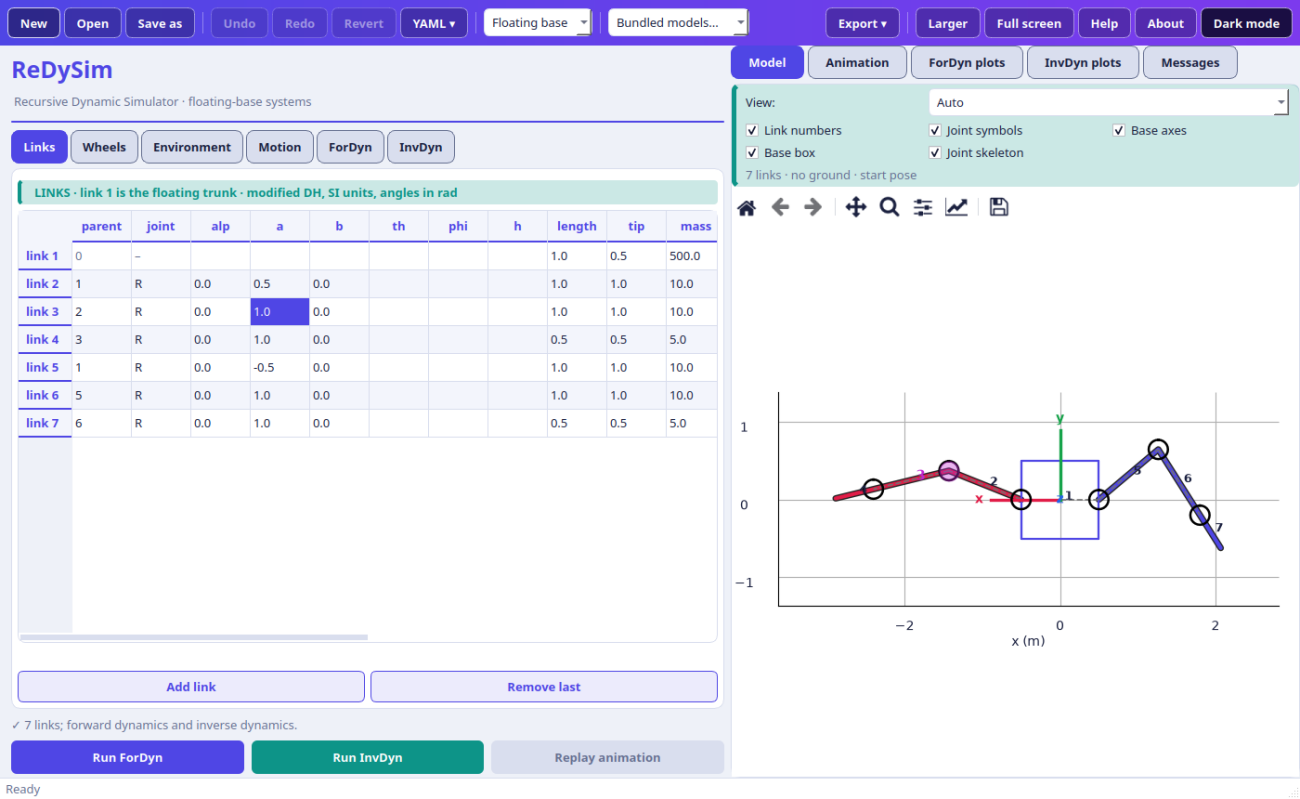
The window works like the fixed-base one (the same plots, animation player, export, themes and undo), with these differences:
- The Model tab shows the robot with its base: the trunk as a box (sized from its mass and inertia), the joints tied to their parents by dashed lines, and the trunk's own axes. See Model and animation.
- The robot is edited in tabs: Links and Wheels are tables, Environment and the run settings are forms, the controller (ForDyn tab) and the joint motion (Motion tab) are small YAML editors with examples, checked by the package. Every key of the file has a place in them; the file itself is in the YAML menu.
- The results include the base: its position, orientation and velocity, the energy, and for a robot on the ground the ground forces and the height of the feet.
All numbers are in SI units (metres, kilograms, newtons, seconds) and angles are in radians.
An angle can be typed as pi/2 or radians(90), in the forms, the links table and the model file.
In the forms and tables, 90d is a quick way to type degrees: when you leave the box it shows
radians(90).
A five-minute tour
- Open the floating-base window. Start the program with
--floating, or choose Floating base in the list next to the bundled models (see Fixed base and floating base). It opens on a space robot. - Look at it. The Model tab draws the 500 kg base as a cube and two arms of three links each. Click a row of the Links table on the left: that link is marked in the drawing.
- Change something. In the table, set the
aoflink 5to-0.8. The second arm moves along the base. The title bar shows a*: the model has unsaved changes. - Undo it with Ctrl+Z. The arm is back, and the
*goes away. - Run it. Press Run ForDyn (or Ctrl+R): 4 seconds of motion. The Animation tab plays: the arms move to a new pose and the base recoils, because nothing holds it.
- Read the plots. Open ForDyn plots. Base position shows the recoil.
- Save what you got with the Export menu: the animation as a GIF or MP4, the plots as images, or the numbers as a CSV file.
Next: the Links and Wheels tables.